
How to Activate Windows 11 with a Product Key (Step-by-Step 2026 Guide)

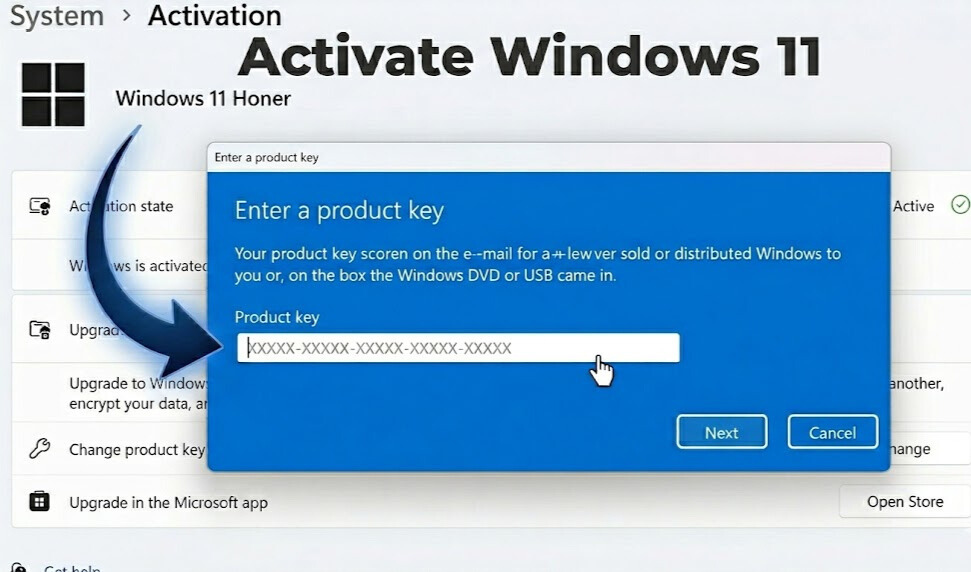
How to Activate Windows 11 with a Product Key (Step-by-Step 2026)
Want to activate Windows 11 with product key quickly and correctly? This guide shows where to enter your key, how to confirm activation, and how to fix the most common errors.
- Instant digital delivery
- Activation support included
- Secure checkout
If you see the “Activate Windows” watermark, don’t panic. In most cases, you can activate Windows 11 with product key in under 3 minutes. The key is using the right menu in Settings and confirming your Windows edition (Home vs Pro).
In this tutorial, you’ll learn exactly how to activate Windows 11 with product key, how to verify your activation status, and what to do if Windows shows errors like 0x803F7001 or 0xC004F050. You’ll also find official Microsoft references and safe troubleshooting steps.
Before You Start: What You Need to Activate Windows 11
- A valid Windows 11 product key (25 characters)
- Internet connection (recommended for fast activation)
- Correct edition installed (Windows 11 Home or Windows 11 Pro)
To check your edition: go to Settings → System → About and look under “Windows specifications.” If you’re unsure, this simple step prevents most activation issues.
Official reference: Microsoft explains activation and digital licenses here: Windows activation help.
Activate Windows 11 with Product Key in Settings (Step-by-Step)
This is the easiest method and works for most users. Follow these steps to activate Windows 11 with product key from the Settings app.
Step 1: Open Activation Settings
- Click Start → open Settings
- Go to System
- Click Activation
Step 2: Enter Your Product Key
- Click Change product key
- Enter your 25-character key
- Click Next → then Activate
Activate Windows 11 with Product Key Using Command Prompt
If Settings doesn’t work, you can still activate Windows 11 with product key using Microsoft’s built-in licensing commands. This is helpful after reinstallations or when the Activation page is stuck.
Command method (Admin)
- Right-click Start → choose Terminal (Admin)
- Run:
slmgr /ipk YOUR-PRODUCT-KEY - Then run:
slmgr /ato
Microsoft reference on activation tools: SLMGR options documentation.
How to Check If Windows 11 Is Activated
After you activate Windows 11 with product key, confirm it’s done correctly:
- Open Settings
- Go to System → Activation
- Look for: Active / “Windows is activated…”
Fix Common Errors When You Activate Windows 11 with Product Key
Error 0x803F7001 (No license found)
- Check internet connection and try again
- Confirm you installed the correct edition (Home vs Pro)
- Restart your PC, then retry activation
Error 0xC004F050 (Invalid key)
- Re-type the key carefully (avoid O/0 confusion)
- Make sure the key matches Windows 11 edition
- Try the Command Prompt method above
Activation servers busy
- Wait 15–60 minutes and retry
- Restart the PC
- Try again via Settings
Troubleshooting guidance from a trusted tech source: PCMag activation basics. (Steps are similar, but this article helps explain common activation problems.)
FAQ: Activate Windows 11 with Product Key
Where do I enter my Windows 11 product key?
Go to Settings → System → Activation → Change product key, then enter the 25-character key.
Why can’t I activate Windows 11 with product key?
The most common reason is an edition mismatch (Home vs Pro). Check your edition and try again.
Can I activate Windows 11 without a Microsoft account?
Yes. You can activate using a product key without signing into a Microsoft account.
Is activation permanent?
Activation is permanent for that device under the license terms. A digital license may also link to your Microsoft account.
Where can I buy a Windows 11 key online?
If you need a key, you can choose the correct edition from ActivateSoftKeys: Windows 11 Home or Windows 11 Pro.